Free to start · no card · nothing to install
An event diagram maker that draws to real dimensions
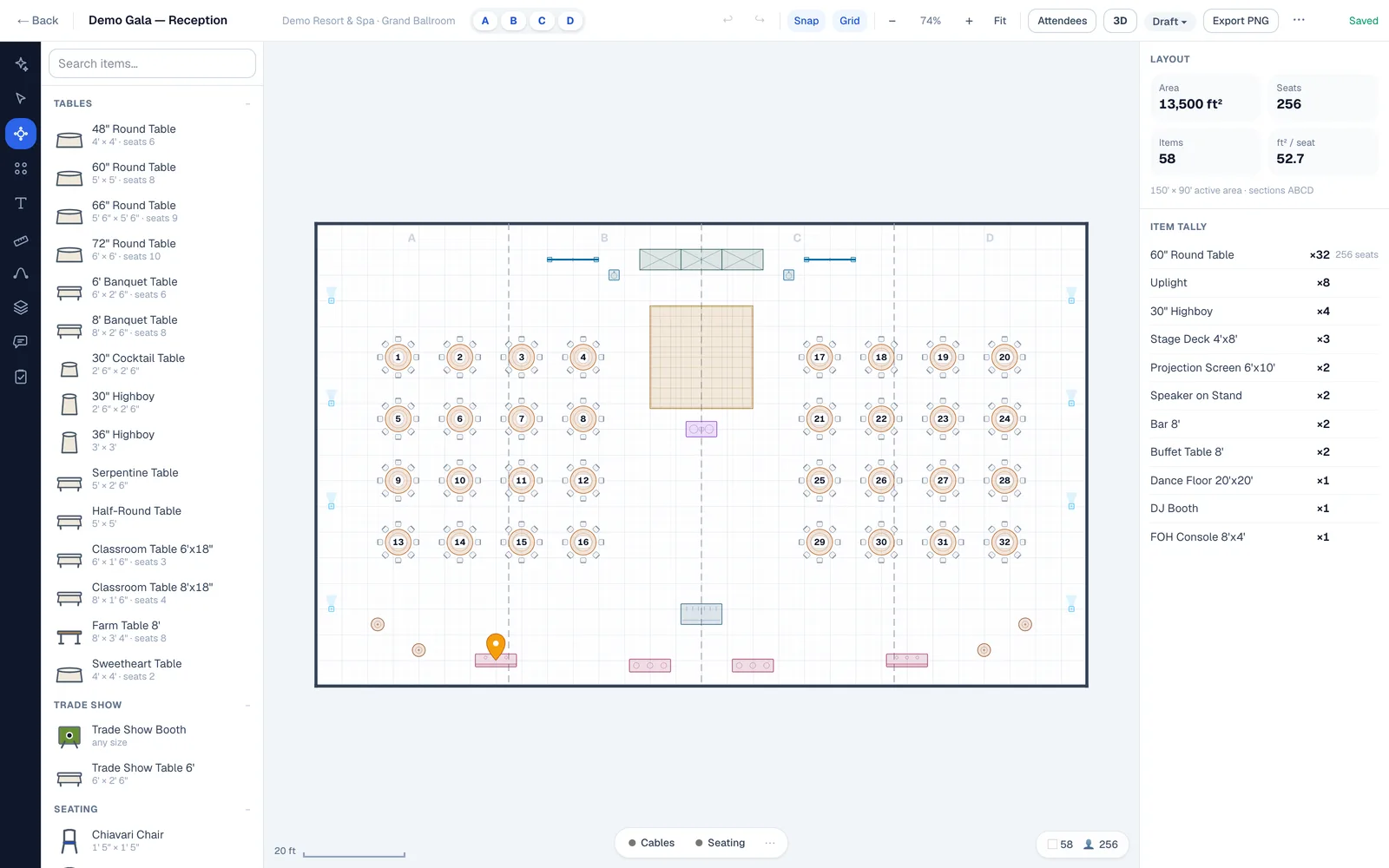
Most diagram tools give you shapes. This one gives you the event space at its true size and objects that know what they are — a 60-inch round is five feet across, seats ten, and stands thirty inches tall whether you are looking at the plan or walking it in 3D. Make an event diagram the setup crew can work from, not a picture of one.
Why a general diagram tool falls over
A diagram maker draws shapes. An event diagram is a measurement.
You can build something that looks like a ballroom in any drawing app: drop circles for tables, a rectangle for the stage, done in ten minutes. The trouble comes the morning of, because the circle labelled “60″ round” is whatever size you dragged it to, and nothing in the file knows that the dance floor and the last two tables want the same fourteen feet.
An event diagram is a working document for people who have to place furniture in a real space. Here is the difference, line by line.
| A general diagram maker | An event diagram maker | |
|---|---|---|
| The objects | Shapes sized by dragging a handle | 216 objects at real width, depth and height in feet and inches |
| The space | A rectangle you drew by eye | A traced perimeter at true scale — L-shaped atrium, lawn, rooftop, tented field |
| Capacity | A number you type into a text box | Counted off the chairs actually placed, so the plan can tell you it does not fit |
| Clearances | Eyeballed | Measurable, because the aisle between two rounds is drawn at the width it will be |
| Height | Not a concept | Carried by every object — which is what lets the same file become a 3D walkthrough |
| The handoff | An image someone has to interpret | A PDF at a stated scale with a title block and a load list of everything on the plan |
| Next event, same space | Redraw it | The space is drawn once; every setup is a new diagram inside it |
The checklist
Seven things an event diagram has to carry
This is the list a diagram gets held to when it reaches a banquet captain, an AV lead and a fire marshal. A diagram missing three of them will still be redrawn on the loading dock.
- The real perimeter, with its dimensions — including the airwall position if the event space divides, because half a ballroom is not half a rectangle.
- Every object at its true footprint, named as the thing it is: 72-inch round, 6-foot banquet, 8-foot bar, 4×8 stage deck.
- The seat count, arrived at by counting chairs on the plan rather than by multiplying tables in your head.
- Circulation — aisles, the service path from the kitchen door, and the width the room actually leaves between the last table and the wall.
- Fixed architecture: columns, doors and their swing, service entrances, the low ceiling under the balcony. These are what a plan drawn from a marketing PDF always omits and a load-in always finds.
- Staging, AV and power at their real sizes, with heights — a 16-foot screen on a 24-inch riser is a sightline decision, not a decoration.
- A scale and a title block, so anyone reading it can measure anything on it and knows which version they are holding.
Working from a plan someone else drew? Setting a plan to scale covers how to check the drawing you were handed before you trust it.
Start to finish
Making one takes about twenty minutes
Get the event space in
Import a PDF of an existing diagram and it arrives as editable, to-scale objects rather than a background picture to trace. Or draw the space from its dimensions. Or start from a venue already drawn in the directory.
Lay the setup in
Drag in rounds, banquets, staging, dance floor, bars and buffets from the object library — or describe the setup to the AI copilot in plain English and adjust its draft. Seat counts update as you place.
Send one link
Export a PDF, PNG or SVG with a load list, or share a link that opens the live plan in a browser. Viewers never need an account and are free on every plan, however many you send it to.
Every diagram lives inside an event with its date and its workflow status, so the second setup for the same client is a new diagram in the same folder, not a file named final-v4-REAL.pdf.
One scene, two views
The 3D view is the same diagram, standing up
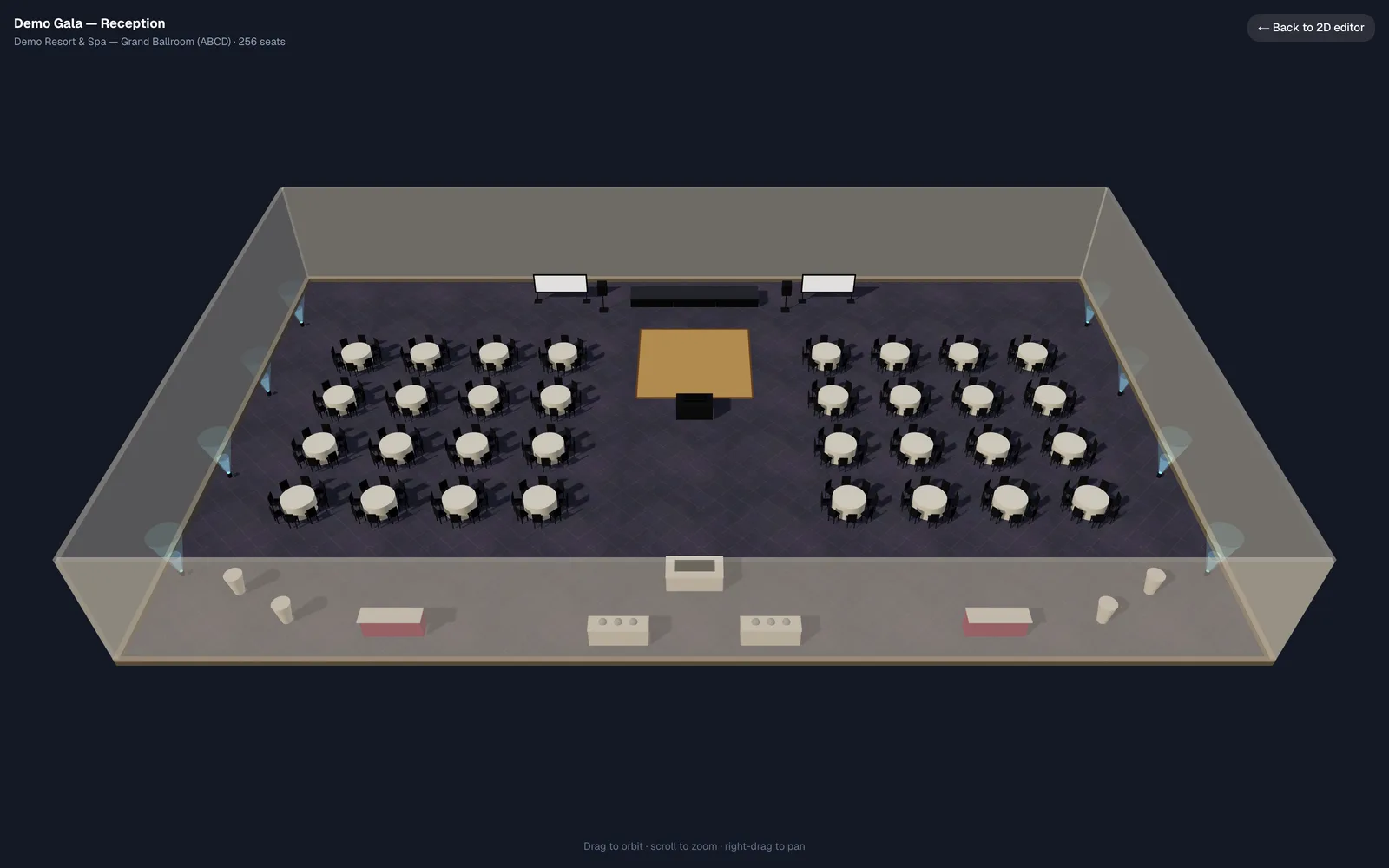
Because every object carries a real height, the diagram you just made is already a three-dimensional scene. There is no second drawing to maintain and nothing to re-model: move a table in plan and it has moved in the walkthrough.
That is what answers the questions a flat diagram cannot — whether the back tables can see over the centerpieces, whether the screen clears the chandelier, what the room looks like from the doors when the client walks in. Account holders get the 3D view on Pro and up; anyone you send a share link to can look at the plan in 3D whatever plan you are on.
What it costs
Free is a plan, not a trial
No card, no clock counting down. Here is exactly where the line sits so you can decide before you spend an evening in it.
Free — $0
One active diagram, one editor, the core object library, three AI copilot messages a month, and unlimited free viewers on a share link. Exports carry a watermark. Enough to draw one event space properly and see whether the geometry holds up.
Solo — $9/mo
Unlimited diagrams and events, the standard library, exports with no watermark, and share links your client can approve. The step most people take once the first diagram has earned its keep.
Pro — $18/mo
Three editors, the full production library, the 3D walkthrough, more copilot and your branding on every export.
A venue with a whole property to publish is on a different meter — billed per property and sized by its event spaces, with the first ones converted for you and an unlimited team. Both ladders are on the pricing page.
Questions
Is there a free event diagram maker?
This one, with a stated limit rather than a trial clock: one active diagram, one editor, the core object library, three AI copilot messages a month, unlimited free viewers on share links, and watermarked exports. No card to start. If one event space is all you need, free is all you need — and if you outgrow it, Solo is $9 a month.
What is the difference between an event diagram and a floor plan?
In practice the two words get used for the same drawing. Where people do separate them: the floor plan is the space itself — walls, doors, columns, dimensions — and the event diagram is one setup drawn inside it for one date, with the tables, staging and bars in place. That is how it works here too: the event space is drawn once, and each diagram is a setup inside it. If it is the space you are drawing, start with our event floor plan software; if it is a seating plan by name, start with seating chart software.
Do I need CAD, or any design experience?
No. It runs in a browser, you place objects by dragging them, and the dimensions come with the objects rather than being something you draft. People who have never opened CAD make their first usable diagram the same afternoon. What it is not is a general drawing app — you cannot make a flowchart in it.
Can I start from a diagram I already have?
Yes. Import a PDF and it arrives as editable objects at the right scale. If what you have is an architect’s drawing, a photographed setup sheet, or an export from another diagramming tool, send it through the venue setup offer and we draw it to scale for you — up to five event spaces, by the size of the property.
Does it make 3D event diagrams?
Yes, from the same file — every object carries a real height, so the plan and the walkthrough are one scene rather than two drawings. Account holders get the 3D view on Pro and up; anyone opening a share link can view the plan in 3D regardless of the plan you are on.
Does it handle a ballroom that divides?
Yes, and it is the reason a lot of venues move. The space is drawn once with its airwall positions, and every combination of sections derives from that one drawing — so a re-measure fixes every combination at once instead of being redrawn in each. How airwalls work covers it.
Who is it for?
Venues, hotels, caterers, rental companies, AV shops, and independent planners — anyone who has to tell somebody else where the furniture goes. The persona pages under who it is for cover each one; hotels and venues is the fullest.
Make one and see
One real event space, twenty minutes, no card. If the geometry does not hold up you will know inside the first one.